Slik kjøper du
Trenger du råd? Våre kunskapsfulle forhandlere er mer enn glad for å hjelpe deg. Selv med store og små spørsmål.
Finn en forhandler nær deg


Last week we started and also completed the development of a small but very useful assistant: ‘Silence fan’.
The fans in certain models of our Multi and Quattro Inverter/Chargers can be quite noisy, especially in the dead of night in your motor home, RV or boat; very annoying, we know. And since you have all night, it isn’t necessary for the Multi to charge at maximum amperage .
I am happy to present a solution! Wire a simple on/off switch to an input of your choice: the Auxiliary input or to the Temperature sense input. And add and configure the ‘Silence fan’ assistant. The motor home owner can then enable and disable the fans with that switch. During charge, the charger will reduce its output current. Not immediately, but only after the internal temperature has increased over the threshold. And when inverting, the Multi will have a reduced maximum inverter power. It will switch off and reach the temperature alarm faster. Because many people might be OK with a reduced charge, but still like to run the coffee machine without first having to remember the switch, we have added an option to only disable the fans in charge-mode.
Many thanks to our German distributor Transwatt, for their suggestions!
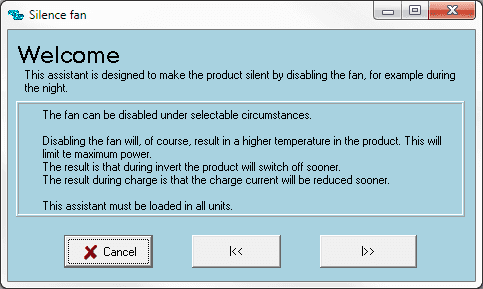
Herewith the screenshots of the new assistant. The first one explains what it is for, and the consequences of disabling a fan:
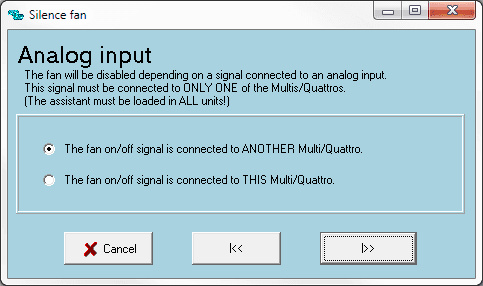
This second one will only be shown in systems with multiple units connected in a parallel, split-phase or three-phase system.
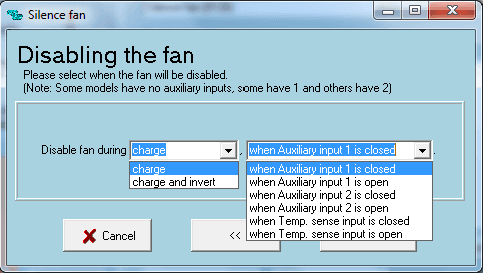
And this last one lets you select, if you wish, to disable the fan only during charging, or also when in inverter mode. It also lets you select the input you used, and if you want to use it as normally open, or normally closed.
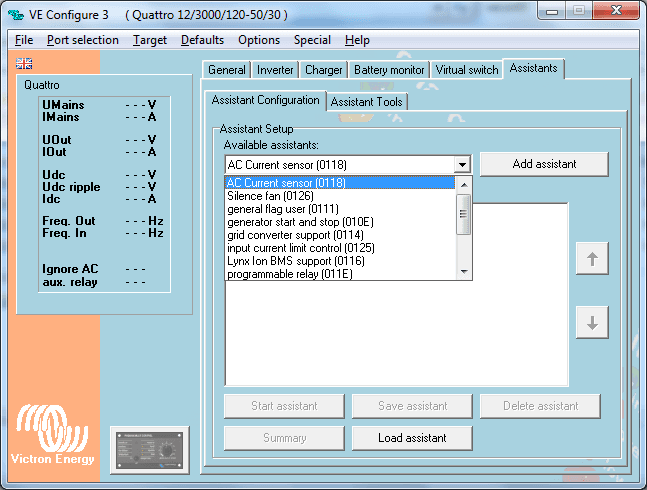
VEConfigure3 will automatically download and add the new assistant to its library:
To use it, the Multi or Quattro needs to be updated to firmware version xxxx206, which was also released last week. See the ‘Updating your computer and Multi to VEConfigure 3 PDF’, available from our Software downloads page for instructions on obtaining the necessary files and the update process.
Make sure to use the latest version of VEFlash. Download link also available on the Software downloads page. Older versions will give an error: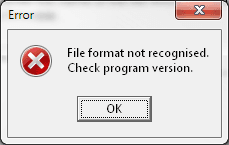
Matthijs – Victron Energy.
Trenger du råd? Våre kunskapsfulle forhandlere er mer enn glad for å hjelpe deg. Selv med store og små spørsmål.
Finn en forhandler nær deg
Sjekk med vår support ressurs eller kontakt din lokale forhandler for dedikert support, reparasjon eller garantiforespørsel.
Support
Les mer om vår bransjeledende 5-års standardgaranti og globale reparasjonsservice.
Garanti

Meld deg på vårt nyhetsbrev på ditt foretrukne språk

Dette er Victron

Personvernserklæring
Informasjonskapselpreferanser
Bruk av informasjonskapsler
Vilkår for bruk
Juridisk merknad
©Victron Energy 2026